> ## Documentation Index
> Fetch the complete documentation index at: https://comfydeploy.mintlify.site/llms.txt
> Use this file to discover all available pages before exploring further.
# Data Flow
> Understanding how data flows through ComfyDeploy
This document outlines the core data flow in ComfyDeploy, focusing on what matters most to you: your workflows, run history, and outputs.
## Data Components
| Component | Type | Storage | Access |
| --------------- | ------------------------- | ---------- | ----------------------------------------- |
| **Workflows** | `.json` | `postgres` | `Dashboard` / `API` |
| **Models** | `.safetensors` | `volume` | `Dashboard` / `API` |
| **Run records** | `.json` | `postgres` | `Dashboard` / `API` |
| **Inputs** | `.png` / `.jpg` / `.webp` | `s3` | `Dashboard` / `API` |
| **Outputs** | `.png` / `.jpg` / `.webp` | `s3` | `Public unique URL` / `Dashboard` / `API` |
This is a high-level overview of ComfyDeploy's data flow. Some technical details and advanced features may be simplified for clarity.
Custom S3 Integration requires a Business Plan.
## Importing a workflow
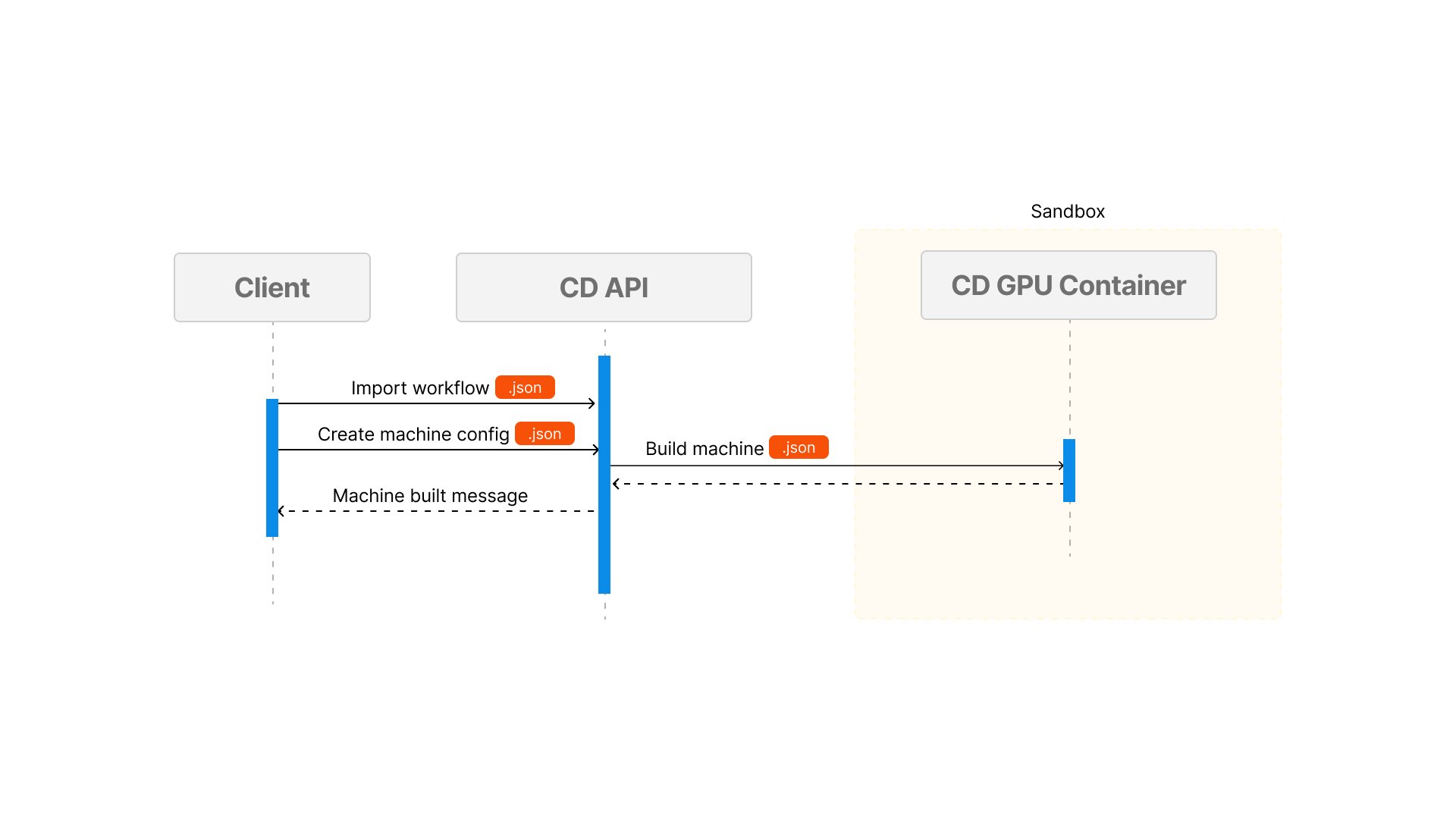 | Step | Action | Result |
| ---- | --------------- | -------------------------------------- |
| 1 | Import workflow | Workflow\.json saved to postgres |
| 2 | Machine config | Machine config saved to postgres |
| 3 | Create machine | Machine image built and ready to serve |
## Using Session
| Step | Action | Result |
| ---- | --------------- | -------------------------------------- |
| 1 | Import workflow | Workflow\.json saved to postgres |
| 2 | Machine config | Machine config saved to postgres |
| 3 | Create machine | Machine image built and ready to serve |
## Using Session
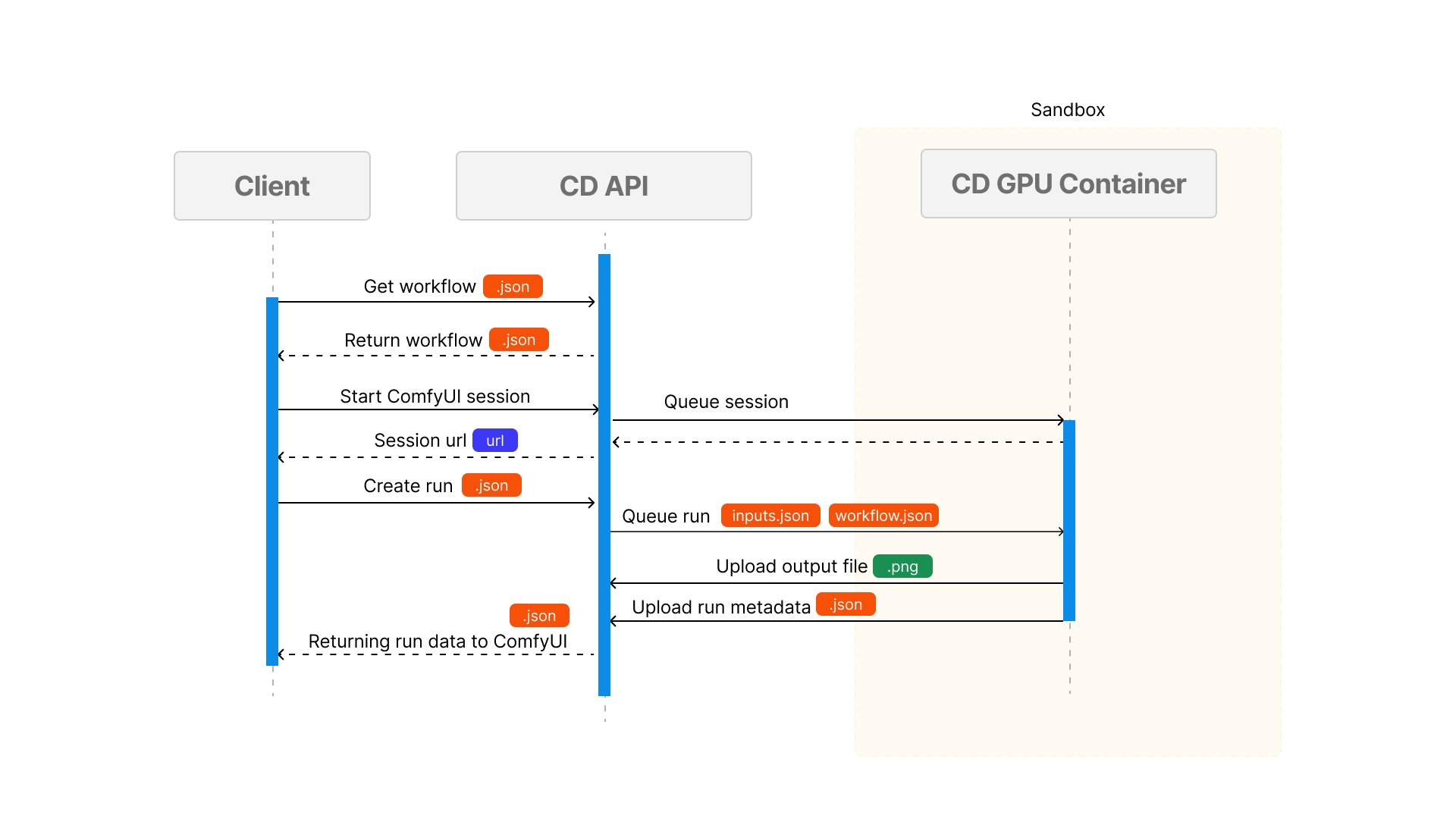 | Step | Action | Result |
| ---- | ----------------------- | ---------------------------------------------- |
| 1 | Getting workflow | Workflow\.json loaded from postgres |
| 2 | Start ComfyUI session | Queue job to start ComfyUI session |
| 3 | ComfyUI session started | Session URL returned to user |
| 3 | Run workflow | Workflow runs and outputs saved to ComfyDeploy |
| 4 | Output results | Access via ComfyUI session |
## Workflow / API Run
| Step | Action | Result |
| ---- | ----------------------- | ---------------------------------------------- |
| 1 | Getting workflow | Workflow\.json loaded from postgres |
| 2 | Start ComfyUI session | Queue job to start ComfyUI session |
| 3 | ComfyUI session started | Session URL returned to user |
| 3 | Run workflow | Workflow runs and outputs saved to ComfyDeploy |
| 4 | Output results | Access via ComfyUI session |
## Workflow / API Run
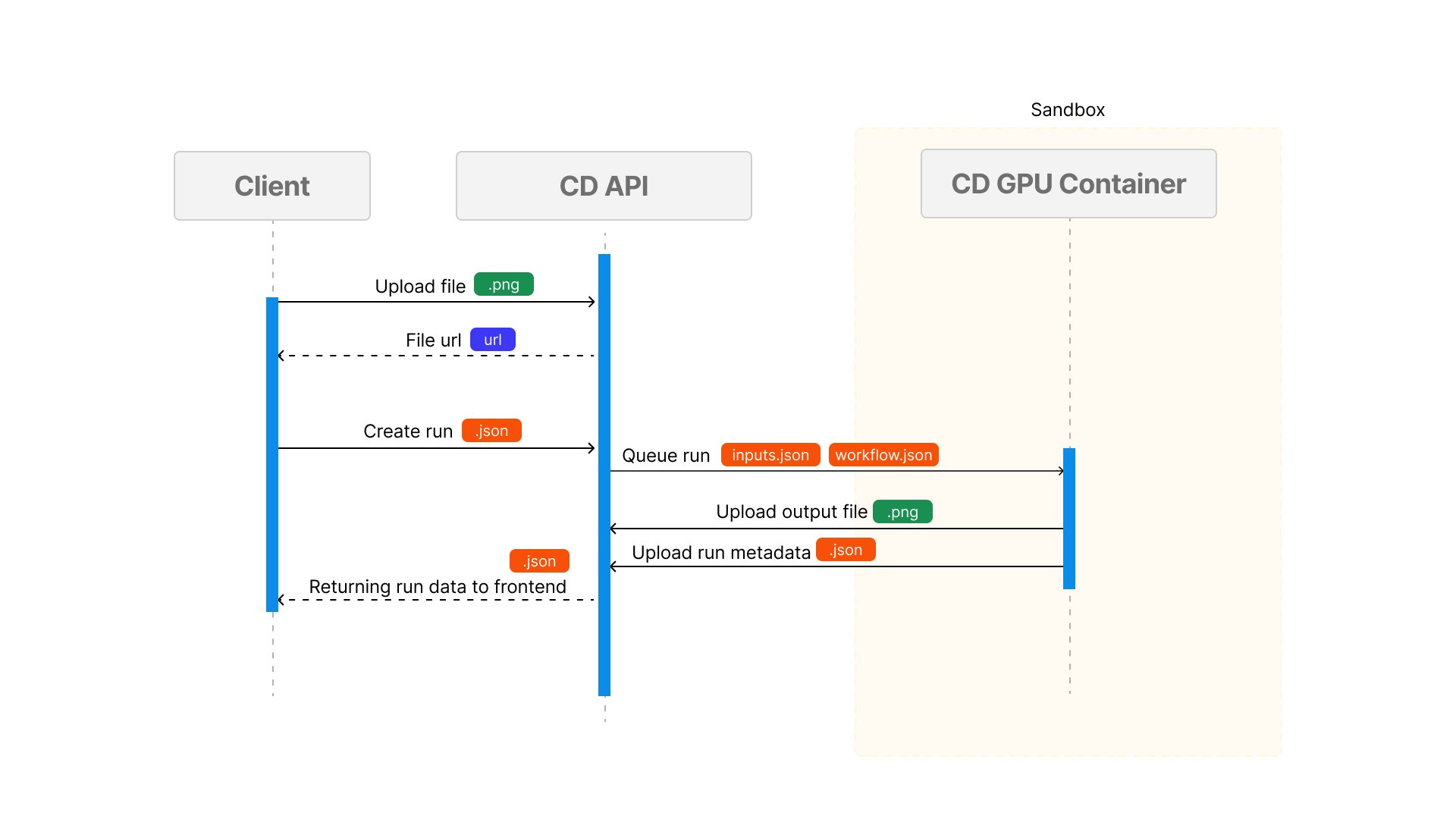 | Step | Action | Result |
| ---- | ------------------- | ------------------------------ |
| 1 | Receive user inputs | Image upload to `s3` |
| 2 | Execute workflow | Creates `run` record |
| 3 | Monitor progress | Updates in `run history` |
| 4 | Generate outputs | Stored in ComfyDeploy |
| 5 | Output results | Access via `public unique URL` |
If you are interested in using your own media storage, you can use our [Custom S3 Integration](/v2/integration/custom-s3) to store your media in your own S3 bucket.
| Step | Action | Result |
| ---- | ------------------- | ------------------------------ |
| 1 | Receive user inputs | Image upload to `s3` |
| 2 | Execute workflow | Creates `run` record |
| 3 | Monitor progress | Updates in `run history` |
| 4 | Generate outputs | Stored in ComfyDeploy |
| 5 | Output results | Access via `public unique URL` |
If you are interested in using your own media storage, you can use our [Custom S3 Integration](/v2/integration/custom-s3) to store your media in your own S3 bucket.